
Head-up display windscreens
Why a car with a head-up display needs a HUD windscreen, what goes wrong with a standard one (double or blurred images), and how to recognise a HUD screen.
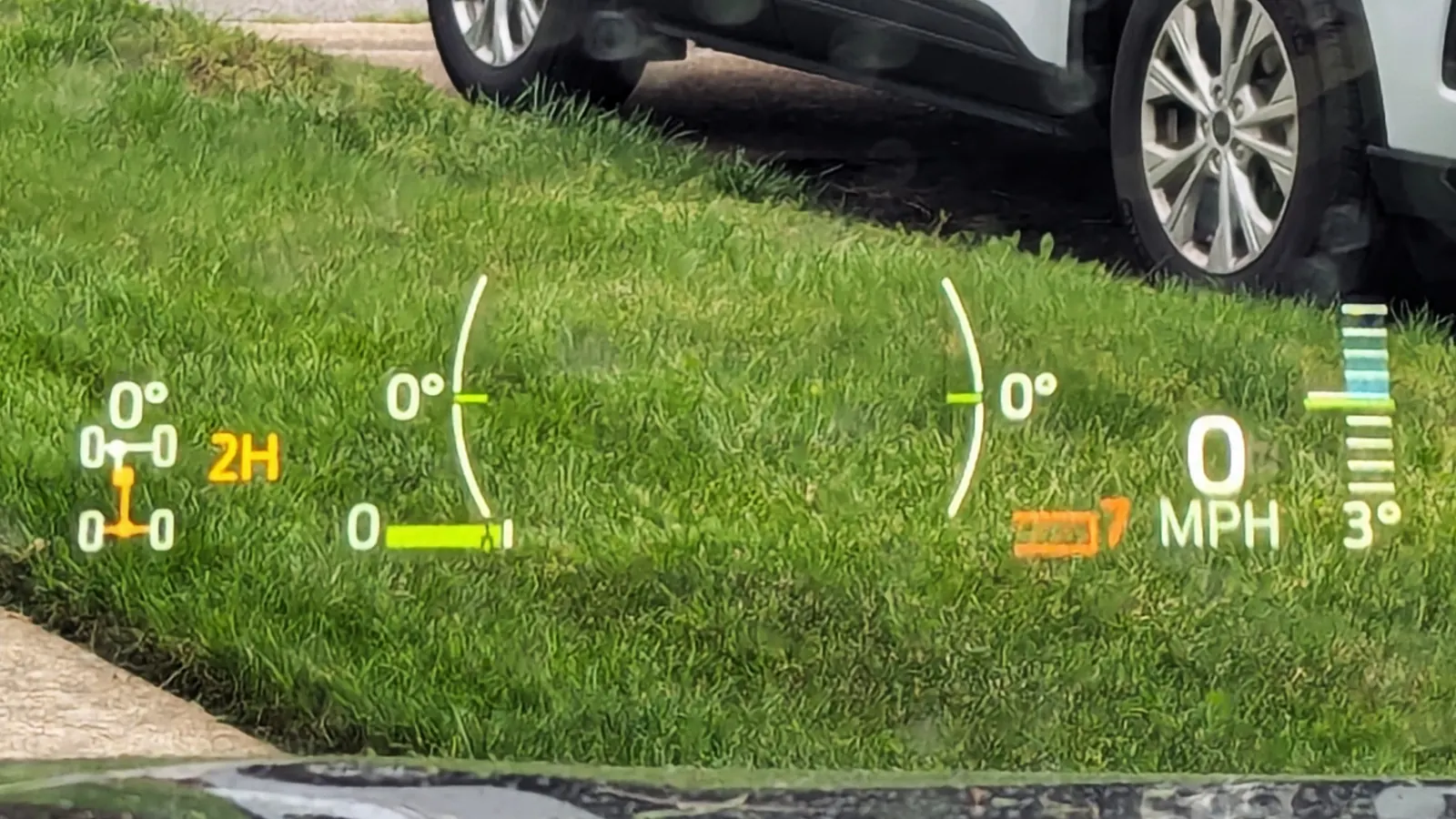

A head-up display (HUD) that projects onto the windscreen needs a windscreen made for it. A normal laminated screen reflects the image twice, once from each glass surface, so the driver sees a double or ghost image. A HUD windscreen has a wedge-shaped interlayer that lines the two reflections up, which is why it is a different part from the non-HUD screen on the same model.
How a windscreen head-up display works
A HUD shows information such as speed, navigation arrows and warnings in the driver's line of sight, so they do not have to look down at the instruments. Typically the projector sits in the top of the dashboard on the driver's side. It shines the image up onto the windscreen, and the glass reflects it towards the driver's eyes.
The driver does not see the image on the glass itself. They see a virtual image that appears to float over the bonnet, typically about 2 to 2.5 metres ahead. That is the point: the eyes stay focused near the road. It also means the windscreen is part of the optical system, not just a window in front of it.
Why a normal windscreen gives a double or ghost image
A laminated windscreen is two layers of glass bonded to a plastic interlayer, usually PVB. When the HUD light hits the screen, part of it reflects off the inner surface. The rest passes into the glass and part of that reflects off the outer surface. The driver gets two reflections from two surfaces, slightly offset from each other.
On an ordinary screen the offset is enough to see. In one worked example in a published paper on HUD windscreen measurement, the two images ended up about 3 mm apart at 2 metres in front of the driver, roughly four times what the eye can resolve. The result is a blurred or doubled image.
Vehicle makers say the same thing in plain terms. Kia's owner's manual, for example, tells owners of HUD cars to replace the front windscreen with glass designed for head-up display operation, because otherwise duplicated images may be displayed on the windscreen.
The wedge-shaped interlayer in a HUD screen
A HUD windscreen fixes the double image by making the interlayer change in thickness from one edge of the HUD area to the other. This puts a very small angle, a wedge, between the inner and outer glass. The wedge brings the second reflection into line with the first, and the driver sees one sharp image.
A few points about the wedge are useful to know:
- It is tiny. One HUD windscreen measured in that paper had a wedge of about 0.03 of a degree. You cannot judge it by eye.
- It is designed for one car. The wedge angle is chosen for the angle the screen is fitted at, the thickness of the glass and the angle the projector shines at. So the wedge is matched to a particular car.
- It may only cover part of the screen. The projector only uses a small area of glass, so some HUD screens have the wedge only in that zone.
- It can sit alongside other features. Wedge interlayers are made in combination with acoustic and solar layers, so a HUD screen can also be an acoustic or solar screen. See acoustic and solar windscreens.
Because the wedge is built into the laminate, a HUD screen and a non-HUD screen for the same model can look much the same on the bench, yet they are different parts with different part numbers. This is one of the reasons one model can need several screens.
One limit is built in. A fixed wedge is set for a nominal driver eye position, and SAE research on HUD interlayers notes that a constant wedge corrects the double image at a single driver height. A very tall or short driver may see a slightly softer image even on the correct screen.
HUD windscreen replacement: signs of the wrong screen or a poor fit
If a driver complains about a head-up display double image after windscreen replacement, or any other change in the HUD, these are the usual symptoms:
- A double or ghost image. Two copies of the speed or arrows, one slightly above the other. This is the classic sign of a non-HUD screen.
- A blurred image. The two reflections overlap but do not line up.
- A tilted, high or low image. The picture is not where it was before the screen was changed.
- A faint or missing image. The image is hard to see at all.
Before you assume the glass is wrong, rule out the simple causes:
- Many cars let the driver adjust the HUD height, rotation and brightness in the settings menu. Kia's manual lists height, rotation and illumination. A small shift may just need resetting.
- Polarised sunglasses can make the image hard to read.
- Tint film or a metallic coating on the windscreen can make the image invisible. Kia warns against both on HUD cars.
If the image is still wrong, check the part fitted against the part the car needs. Some makers also have a HUD adjustment or calibration step after a windscreen replacement. I-CAR's summary of Kia's repair requirements, for example, says the HUD unit needs calibrating if the image is distorted after the windshield is changed.
Combiner HUDs do not need a special windscreen
Not every head-up display uses the windscreen. A combiner HUD projects onto a small separate, semi-reflective transparent panel that sits on top of the dashboard in front of the windscreen. The windscreen plays no part in the image, so these cars do not need a HUD windscreen. Suppliers describe this as windscreen independence.
So the question to ask is not "does the car have a HUD?" but "does the HUD reflect off the windscreen?". If the image appears on a separate panel, order the screen as you would for a car without a HUD, and check the other features as normal.
How to tell if a car needs a HUD compatible windscreen
Since the wedge cannot be seen, the reliable signs are on the car:
- A HUD button, or a head-up display section in the settings menu.
- A projector window in the top of the dashboard in front of the driver, with no separate panel above it.
- The driver tells you the speed appears "on the windscreen".
- The markings on the screen that is coming out. See windscreen markings explained.
There is no standard symbol for a HUD windscreen that we know of, so do not rely on a printed sign alone. Identify the vehicle exactly and check what is fitted.
A car with a HUD will often have other options too. Many also carry a forward camera behind the mirror for lane keeping or emergency braking, which may need calibrating after the screen is fitted. Read ADAS calibration after a windscreen replacement before you book the job.
Before you order
- Check whether the car has a HUD, and whether it projects onto the windscreen or onto a separate panel.
- Read the VIN from the car rather than relying on the model and trim name.
- Note the markings on the existing screen before you remove it.
- Make sure the screen you order is the HUD version, and check the other features too: camera bracket, heating, acoustic or solar.
- Check for a camera behind the mirror and plan any calibration.
- After fitting, switch the HUD on and check the image is single, sharp and in the right place before the car leaves.
More guides
-
Acoustic and solar windscreens
Quieter and cooler glass: what it is, how to recognise it, and why the swap matters.
-
Windscreen markings explained
The stamp in the corner of the glass, line by line, and what it can and cannot tell you.
-

Heated windscreens: types and how to tell
Fully heated, wire-heated or wiper-park: how to tell, and why a new screen may not heat.